
Smart plugs are one of the easiest smart home upgrades, but they are not all the same and they are not safe for every device. This guide explains US outlet types, wattage and load limits, energy monitoring, schedules, Alexa, Google and HomeKit compatibility, setup tips and what not to plug in. Prices are typical ranges in USD for product types.
US outlet types
Most US homes use standard grounded outlets, often called three-prong outlets. Some older homes have two-prong outlets. Smart plugs usually need a grounded outlet for safety. If your home has two-prong outlets, do not force a three-prong plug or use a cheater adapter without understanding the risk; talk to an electrician. Smart plugs also come in single and dual-outlet versions. Dual-outlet plugs save space but may block the second outlet or make it hard to reach the manual button.
Wattage and load limits
Every smart plug has a maximum load, often listed in amps or watts. A common limit is 15 amps, which at 120 volts is about 1,800 watts, but many plugs are rated lower, such as 10 amps or 1,200 watts. Always check the plug rating and the device rating. Do not exceed the lower of the two. For devices with motors, such as some fans or pumps, the starting load can be higher than the running load. When in doubt, choose a plug rated for the device and avoid guessing.
Pros and cons
- Smart plugs: pros are low cost, easy setup and schedules; cons are load limits and the need to check compatibility.
- Energy monitoring plugs: pros are usage data; cons are higher price and sometimes app-only features.
Energy monitoring
Some smart plugs measure energy use in kilowatt-hours. This helps you find devices that use power while off, such as old chargers or TVs on standby. Energy monitoring is useful for a week or two to learn habits, but it does not automatically save money unless you change behavior or schedules. Check whether the app shows real-time watts, daily totals and cost estimates in USD. Cost estimates depend on your electricity rate, so enter your local rate if the app allows it.
Schedules and automation
Schedules let you turn devices on and off at set times. Use them for lamps, fans and holiday lights. Sunrise and sunset schedules are useful for outdoor lights. Away mode can randomize times to make a home look occupied. Timers are helpful for coffee makers that are rated for smart plug use, but only if the device stays on after power returns. Many devices reset to off after a power outage, so test your setup before relying on it.
Alexa, Google, HomeKit and Matter
Check compatibility before buying. Alexa and Google Assistant support is common. HomeKit support is less common and may require a hub or a specific model. Matter is a newer standard that can help devices from different brands work together, but not every plug supports it. If you use multiple ecosystems, choose a plug that supports the ones you actually use. Also check whether the plug needs a hub or connects directly to Wi-Fi.
Setup tips
Place the plug near your router during setup, connect to a 2.4 GHz Wi-Fi network if required, and update firmware. Name the plug clearly, such as Living Room Lamp. Test voice control and schedules. Keep the plug accessible so you can press the manual button if Wi-Fi fails. Do not stack plugs or use them with power strips unless the plug manufacturer allows it. Keep plugs away from water and out of reach of children.
What NOT to plug in
Do not plug space heaters, hair dryers, toaster ovens, electric kettles or other high-wattage heat devices into a standard smart plug unless the plug is specifically rated for that load and the manufacturer allows it. Heat devices can draw high current and create fire risk. Also avoid plugging in medical devices, refrigerators or freezers, sump pumps or anything that must never lose power, unless you fully understand the risk and have a backup plan. When in doubt, do not use a smart plug.
Frequently asked questions
Can I plug a space heater into a smart plug?
Usually no, unless the plug is specifically rated for heaters and the heater manufacturer allows it. Most standard smart plugs are not meant for high-wattage heat devices.
Do smart plugs work with Alexa and Google?
Many do. Check the listing for Alexa and Google Assistant support, and check HomeKit or Matter support separately if you need it.
Do smart plugs save electricity?
They can help you schedule devices and find standby use, especially with energy monitoring. Savings depend on your habits and electricity rate in USD.
What wattage can a smart plug handle?
It depends on the model. Many are rated around 10 to 15 amps. Always use the lower rating between the plug and the device, and check the listing.
Conclusion
Smart plugs are affordable and useful for lamps, fans and holiday lights, but safety comes first. Check US outlet types, wattage and load limits, energy monitoring, schedules and Alexa, Google, HomeKit or Matter compatibility before buying. Set up plugs near your router, test them, and never plug in high-wattage heat devices unless the plug is specifically rated for them. With typical prices in USD and careful setup, smart plugs can make a US home more convenient without adding risk.
Price ranges for smart plugs are usually modest. Basic single-outlet smart plugs often cost about $8 to $15, dual-outlet models about $12 to $20, and energy monitoring models about $15 to $25. Multi-packs can lower the per-plug price. Avoid the very cheapest plugs with unclear ratings, because load limits and safety certifications matter more than saving a few dollars. Look for a plug with a clear maximum load, a manual button, and a brand that provides firmware updates. If a plug feels loose in the outlet or gets hot during normal use, stop using it and replace it.
Consider where you will use each plug. A plug behind a sofa may be hard to reach, so choose one with a slim profile. A plug for holiday lights should be rated for outdoor use if it will be outside; indoor plugs should stay indoors. For lamps, check whether the lamp has a physical switch that stays on, because smart plugs control power, not the lamp switch. For fans, check whether the fan restarts after power returns. Test each device with the plug before you rely on schedules or voice control.
🛒 Shop This Guide – Buy on Amazon
Affiliate Disclosure: Trend Trolley is a participant in the Amazon Services LLC Associates Program. If you buy through a link on this page, we may earn a small commission at no extra cost to you. Prices and availability change often, so please check the current price on Amazon before you buy.

Kasa Smart Plug HS103 (2-Pack) – Buy on Amazon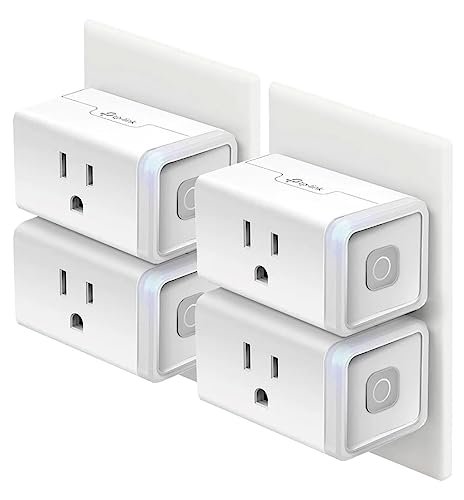
Kasa Smart Plug HS103 (4-Pack) – Buy on Amazon
As an Amazon Associate, Trend Trolley earns from qualifying purchases.